3D Bulk Stockyard Simulator
Test first, install later. The simulator plays the part of a stockyard machine's antennas and gateway: the positioning software connects to it as in the field, and each write it sends back is checked, word by word, against the model.
- Role
- Author, with AI agents
- Period
- Sep–Oct 2026
- Status
- completed
- Industrial automation
- Node.js
- TCP
- NMEA 0183
- Modbus TCP
- WebGL
- Blender
- VM Linux
- Claude Code
Plain explanation
The problem
In a bulk materials yard, huge machines travel on rails and swing long booms. Inside each one, a program works out where it is, from satellite antennas, and passes that position to the system that runs the yard.
To find out whether a new version of that program works, the direct way is to install it and test it in the field, with the machine, the antennas and someone watching the screen. Each test depends on a machine and people in the yard, and watching the screen does not tell you whether each number the program publishes is right.
What it does
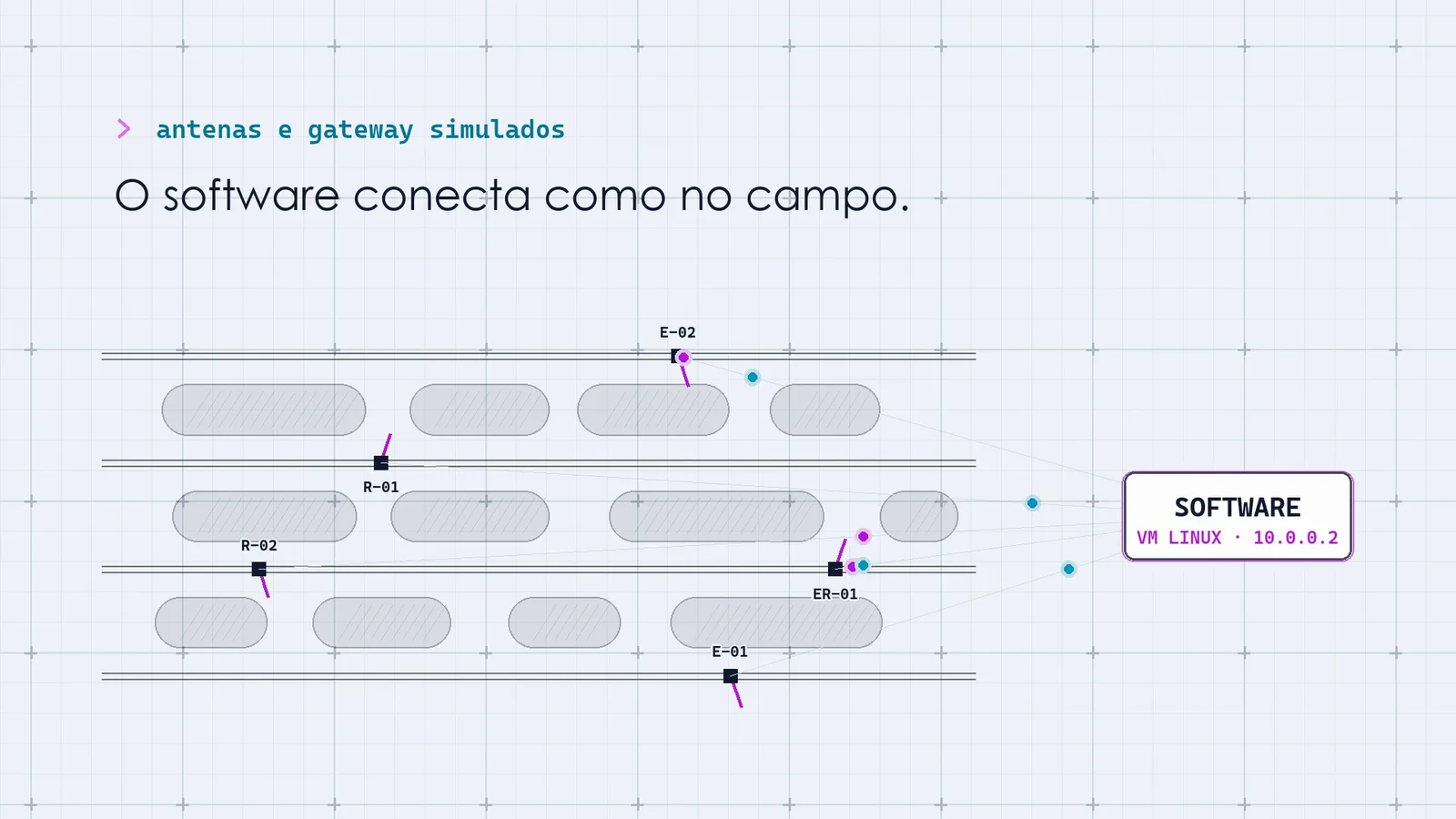
- Plays the part of the antennas
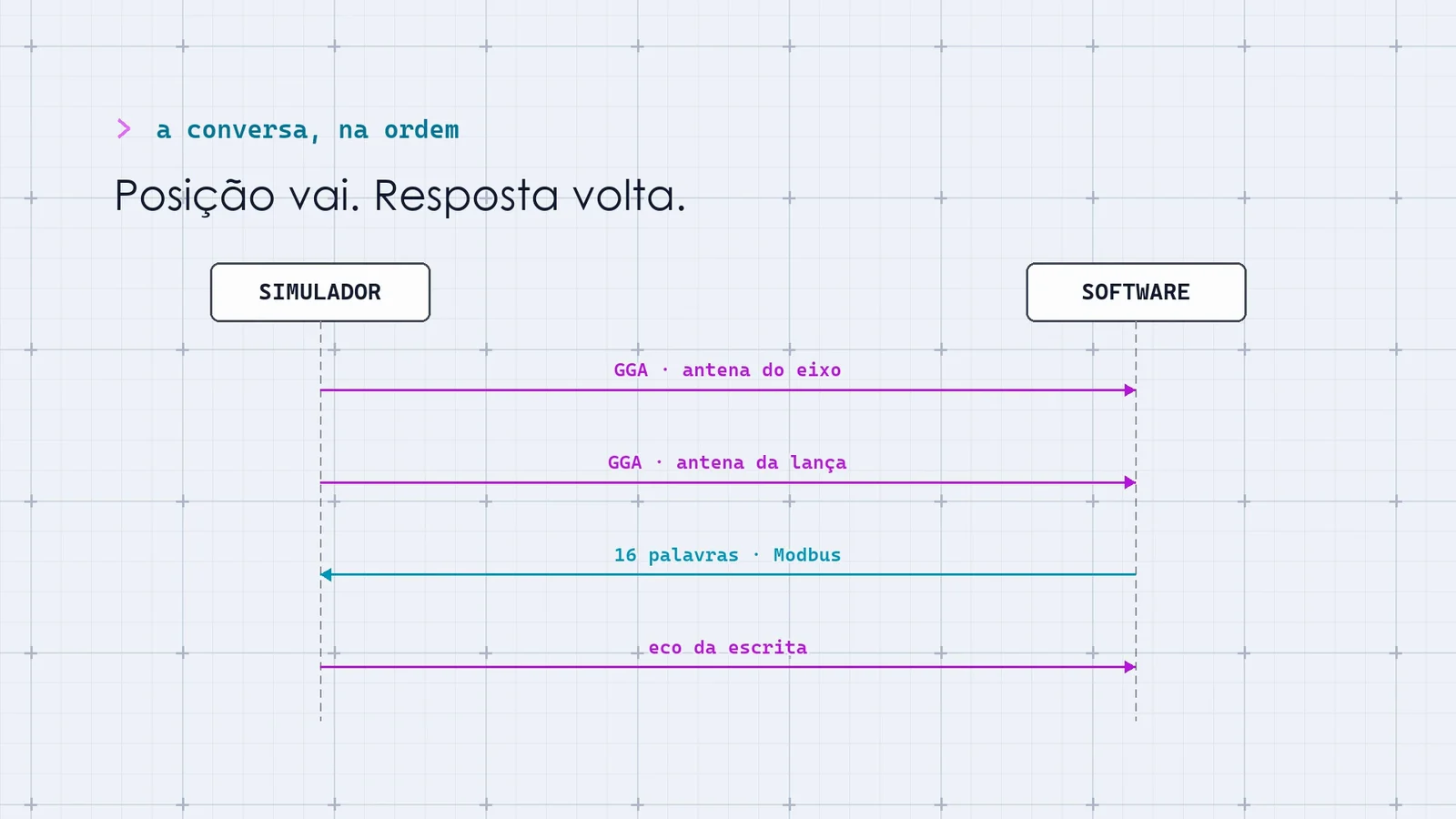
The simulator sends the program the positions the antennas would send, 10 times per second. To connect it, you only change six fields of the configuration: the program under test is the same one that goes to the machine.
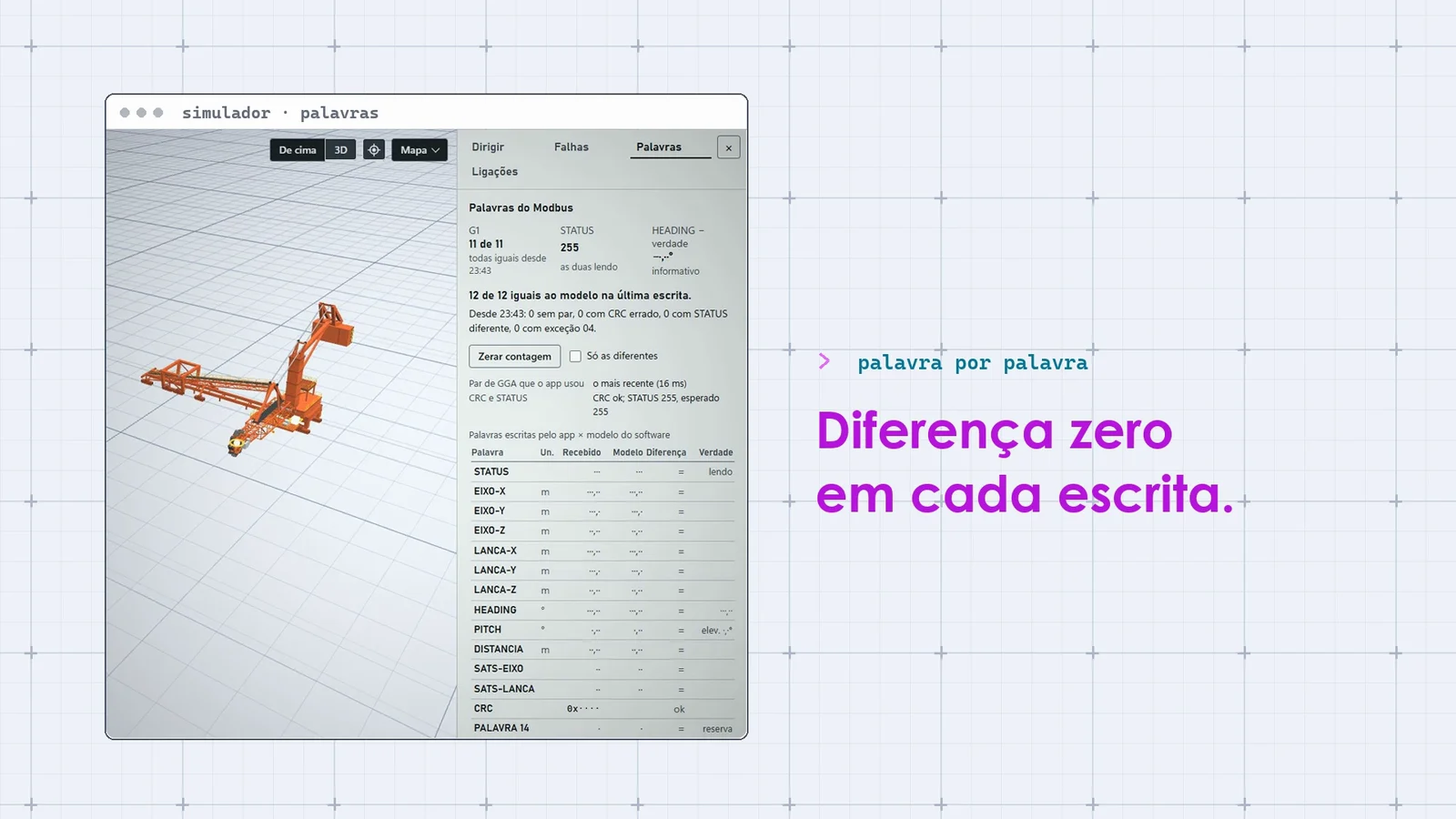
- Checks every answer
The program computes and sends back 16 numbers every half second. The simulator redoes the math and checks, number by number, whether it published what it should have.
- Causes faults on purpose
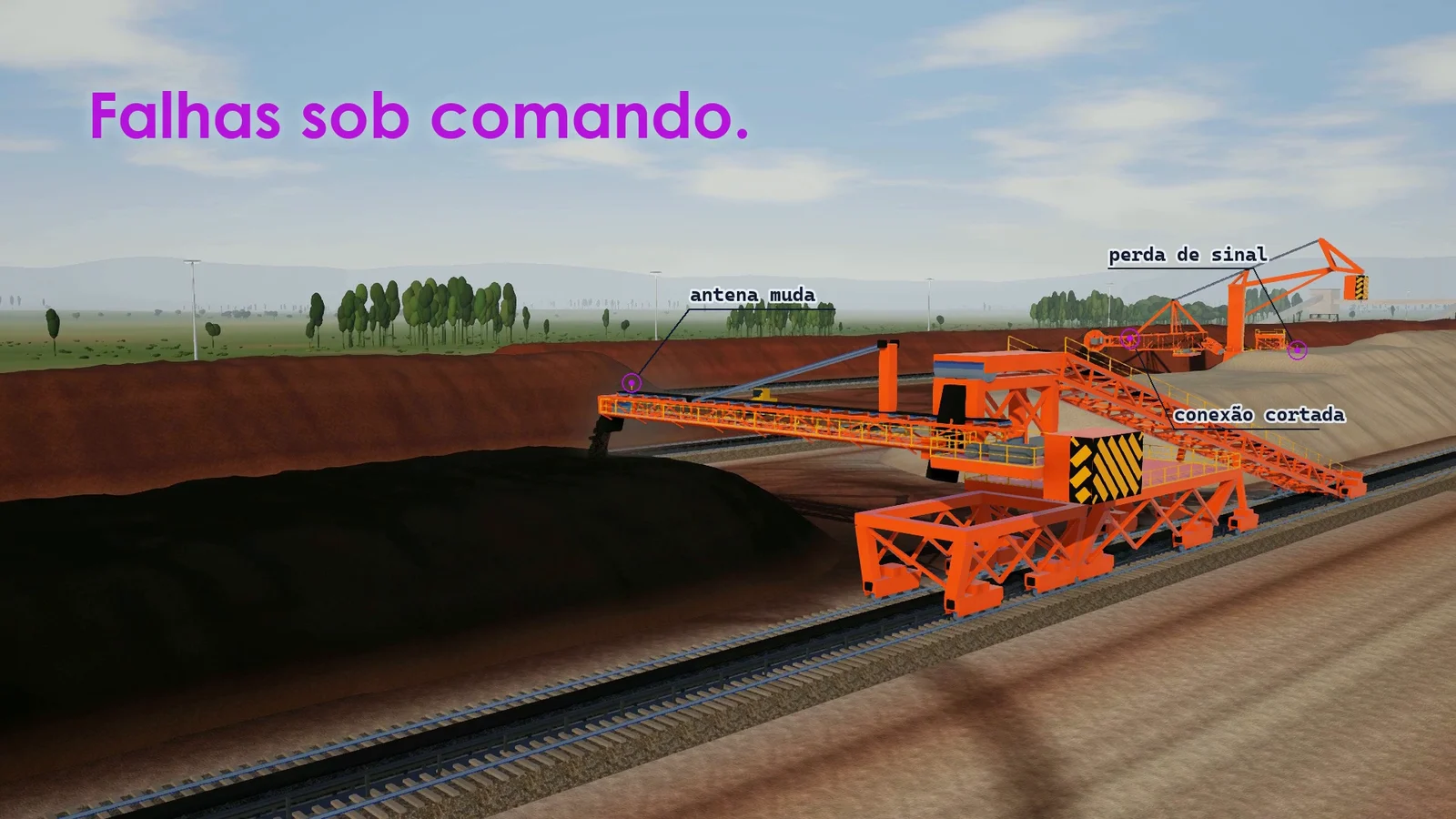
A silent antenna, a frozen position, a dropped connection: faults come in on request, and when the network drops, the simulator measures how long the program takes to come back.
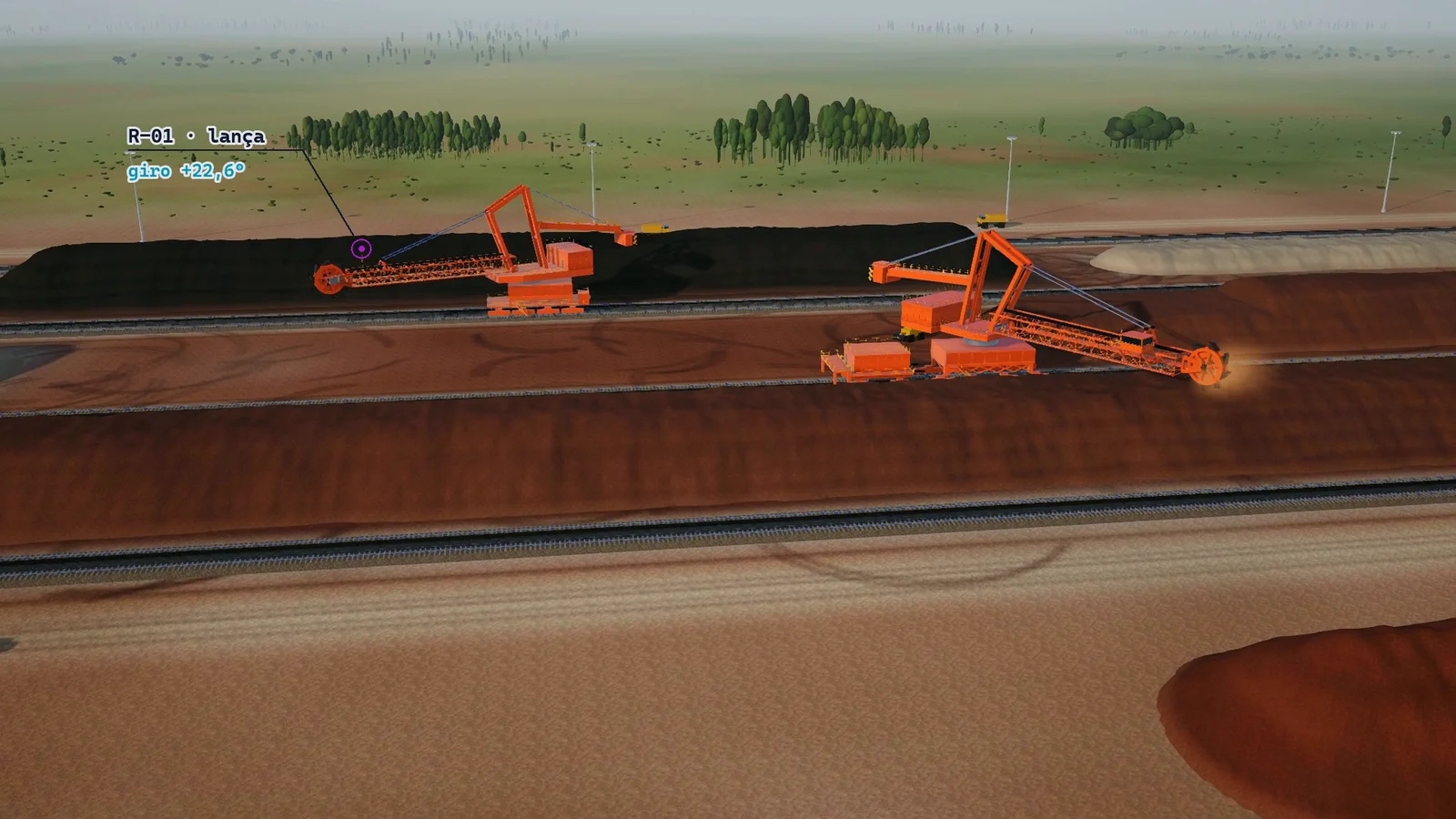
- Shows the yard in 3D
Five machines move at the same time in a 3D yard, and the same movement can be repeated exactly as many times as needed.
On screen
Frames from the simulator's ad, on a copy prepared for the video, with generic machine names.
Tap outside the image to close it.
Tap outside the image to close it.
Tap outside the image to close it.
Tap outside the image to close it.
Tap outside the image to close it.
Tap outside the image to close it.
What changes
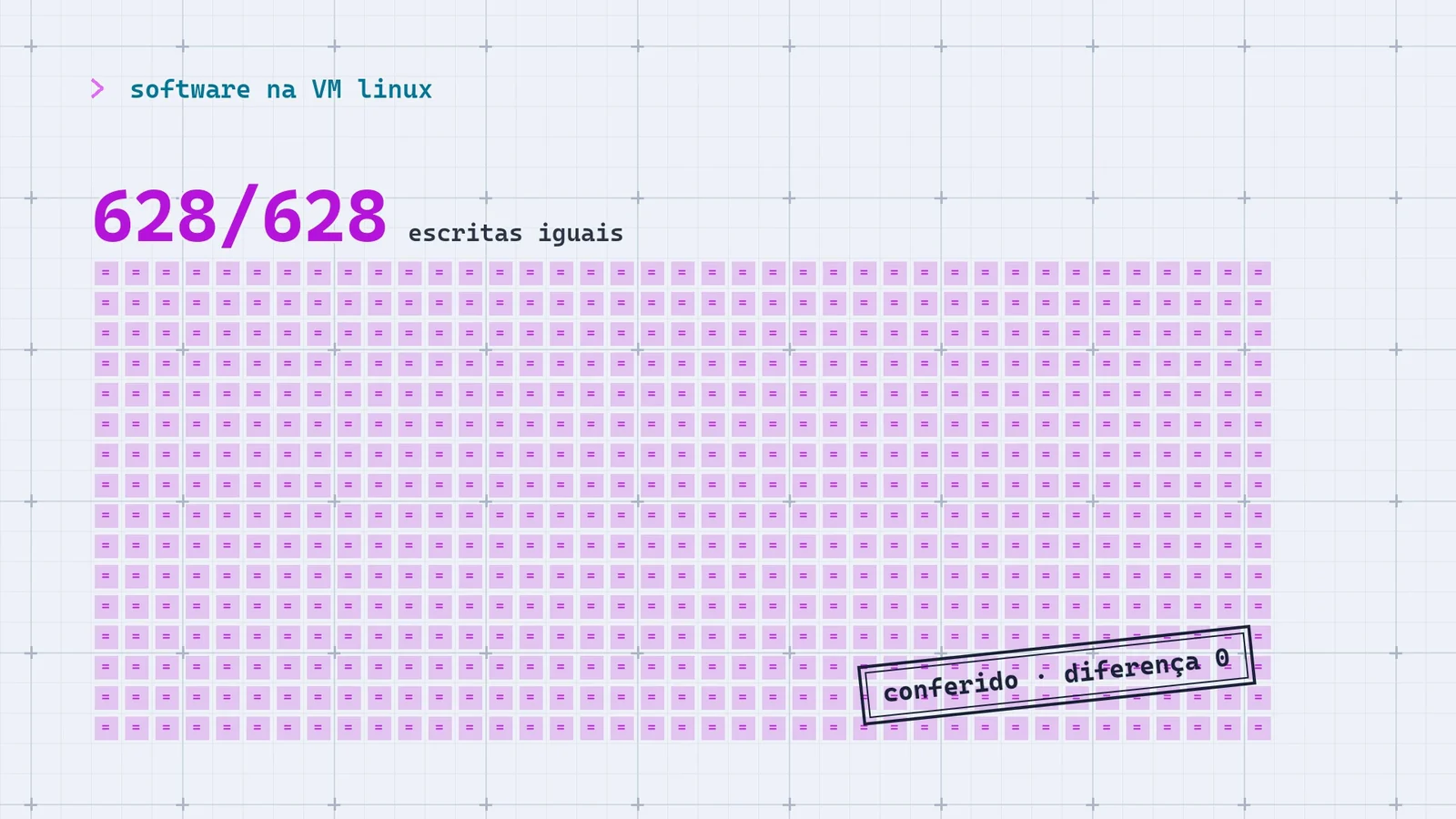
628 of 628
Each new version of the program can be tested on the computer, as many times as needed, before it reaches the machine, and the trip to the yard becomes the confirmation, not the first test.
The test says right or wrong, number by number, instead of someone looking at the screen and deciding it seems right. On the current version, that was 1,202 answers identical to the model, with the real program.
And the same approach serves other equipment whose program reads sensors and talks to the plant's control, such as a shiploader or an overhead crane: test against a simulated plant before going to the field.
Technical explanation
Problem, improvement and result
- Problem
- The positioning software of each stockyard machine, stackers and reclaimers on rails, reads the GGA sentence from the axis and boom antennas, plus the heading on the dual-antenna boom, and writes 16 Modbus words to a gateway for the control system. Validating a new version meant installing it and testing it in the field, with the machine, the antennas and someone watching the screen, with no proof that each published word was right.
- Improvement
- A Node.js simulator with no dependencies plays the part of the antennas and the gateway: it sends GGA over TCP 10 times per second, answers Modbus TCP like the real gateway and redoes the computation with the same model, requiring zero difference in the 12 compared words, plus CRC and STATUS. The software connects by changing six configuration fields, on a Linux VM or on the PC, over a closed network. Around it: faults on command, with recovery time measured for network faults; a 16-phase acceptance script with a verdict per criterion; and five machines in 3D (WebGL, models from Blender), repeatable by seed.
- Result
- On October 1, 2026, with the software on a Linux VM for 5.3 minutes, 628 of 628 writes identical to the model and a correct CRC in all of them; with one parameter changed by 0.1 m, the match dropped to 1 of 628. On the current version, with the real software on the PC, 1,202 identical writes in 4 rounds, with no STATUS difference (October 7). Also: 12 acceptance rounds without failure, on 4 machines and 4 software versions; a median latency from position sentence to write of 90 ms on the VM and 82 ms on the PC; about 145 frames per second with the five machines on an integrated graphics card; 87 automated tests of the simulator.
Evidence
628 of 628 writes identical to the model, with the software on a Linux VM
On October 1, 2026, I ran the software on a Linux VM, connected to the simulator through a private network on the PC itself, for 5.3 minutes, with one machine and the previous version of the simulator: zero difference in the 12 compared words and a correct CRC in all of them. To prove the test discriminates, I changed one parameter by 0.1 m, and the match dropped to 1 of 628.
Measured.
1,202 writes identical to the model on the current version
On October 7, 2026, I tested the current version with the real software on the PC: 4 rounds, no STATUS difference. The five-machine mode was checked with a test client that imitates the software.
Measured.
12 automated acceptance rounds without failure
On the previous version, with the real software on the PC: 16 phases in about 8.5 minutes per round and a verdict per criterion, on 4 machines and 4 versions of the software.
Measured.
87 automated tests passing
73 from the older suite and 14 from demo mode, on October 8, 2026. They check the simulator itself.
Measured.
The problem
To find out whether a new version of the positioning software works, the direct way is to install it and test it in the field, with the machine, the antennas and someone watching the screen. The simulator brings the test to the bench. The software connects to it as if it were in the field, receives the positions, computes and writes the answer, and the simulator says, write by write, whether what it published is what it should have published.
How it is used
The page shows the yard from above or in perspective, with tabs to drive the machine, see the position, inject faults, read the words, see the connections and the log. A verdict at the top says whether the software is publishing the same as the model.
- What comes back. STATUS, the position of the axis and the boom in X, Y and Z, heading, pitch, distance, each antenna’s satellites, the marker, the CRC and two reserved words. X, Z, heading, pitch and distance are multiplied by 100; Y and the marker, by 10.
- Ruler and marker. Each machine’s position along the rail is a ruler in meters. The marker is the position, on the ruler, of the center of the boom tip: in the working slew range, it stays within 0.0 to 0.3 m of it; in the October 2 measurement, on a reclaimer, it ranged from −0.26 m to +0.23 m depending on the boom angle.
- Latency. From the boom antenna’s position sentence to the software’s write, a median of 90 ms on the VM and 82 ms on the PC, in the same 5-minute run; on the VM it was worse because the PC was busy.
- Smoothness. With the five machines in 3D, about 145 frames per second on an integrated graphics card, measured with no frame cap to find the ceiling.
On screen
Tap outside the image to close it.
Tap outside the image to close it.
Tap outside the image to close it.
Tap outside the image to close it.
Tap outside the image to close it.
Tap outside the image to close it.
How it works
The simulator plays the part of the outside world: the position goes down to the software, the computed words go up, and the simulator checks both ends.
- Motion
The machine travels, slews and luffs from the page, goes to a position or replays a scenario.
Node.js - Position
Each antenna sends the GGA sentence over TCP; on the boom with dual antennas, the heading too.
NMEA 018310 per second - Computation
The positioning software, on a Linux VM or on the PC itself, computes the position of the axis and the boom.
VM Linux - Write
It writes 16 words to the simulated gateway, which answers like the real gateway.
Modbusevery 500 ms - Check
The simulator redoes the computation with the same model and requires zero difference in the 12 compared words, plus CRC and STATUS.
difference 0 - Faults
On command, a sentence with a bad checksum, a silent antenna, a frozen position, a dropped or half-open connection and a receiver restart.
The simulator ends at the 16 words: nothing in it decides what the control system does with them. It checks whether the software computes and publishes what it should, given the simulated geometry; field accuracy and performance on the machine's computer are confirmed at installation.
Changing one parameter by 0.1 m drops the match from 628 to 1. That is how we know the test discriminates.
Decisions
Instead of: Checking whether the software's screen looks right.
Cost accepted: The simulator has to reproduce the software's computation, and each new version needs its own model.
Instead of: Only sending wrong positions.
Cost accepted: More cases to maintain, with the software's recovery time measured in each one.
Instead of: A special version of the software just for testing.
Cost accepted: The configuration generator checks, field by field, that nothing else changed.
Instead of: Listening on any of the computer's networks.
Cost accepted: Only the computer itself or the private network with the VM; the other networks are refused, with an automated test.
Instead of: Different movements on every run.
Cost accepted: It is a demonstration, not operation; on some machines, speed and slew limit are estimated, and replacing them with measurements is among the next steps.
Instead of: Ready-made libraries for TCP and Modbus.
Cost accepted: More of my own code for the ports, the NMEA sentences and the gateway's replies.
How it was built
- Sep 2026The bench
Antenna and Modbus simulators and a kit to take the software to the VM.
- Oct 1The live simulator
The simulator on the PC and the software on the VM, side by side, with 628 of 628 identical writes.
- Oct 2Automated acceptance
Coordinate input, tabs, the acceptance script with 12 rounds without failure and a one-minute tutorial with the VM.
- Oct 7Version 4
The emulated dual-antenna receiver and 4 rounds with the real software, with 1,202 identical writes.
- Oct 8The five machines
Demo mode, the articulated machines made in Blender, an adversarial review and the fix.
I built this simulator entirely myself, using AI agents and communication with a virtual machine. I conceived and directed it; the implementation was done in Claude Code sessions, and I ran the tests with the software myself.
Limits
- The simulator ends at the 16 words and checks the computation and the publishing given the simulated geometry; field accuracy and performance on the machine's computer are confirmed at installation.
- The next step is to repeat on the Linux VM, with version 4, the 628-write run done with the previous version, and to connect the real software to the five-machine mode, which today runs with a test client.
- After that, measure per software version how much field time bench testing saves, and replace the speeds and slew limits that are still estimated with measurements.
Today and next
Today
Version 4 runs on my computer, with the five machines and the emulated dual-antenna receiver, and it was checked against the real software on the PC. Each new version of the software can go through the same test before it goes to the machine.
Next
- Test version 4 with the software on the Linux VM, as was done with the previous one.
- Measure how much field time bench testing saves, per software version.
- Replace the speeds and slew limits that are still estimated with measurements.
The images are frames from the project's ad, recorded on a copy of the simulator prepared for the video, with generic machine names and network addresses. The yard is a set made for the video: the piles, the conveyors, the surroundings and the light were created; the rails, the machines and the movements come from the simulator.
The map, the message sequence and the scoreboard are illustrative: they show the kind of data and the order of the exchange, not a recorded run. On the page's screens, the one connected is a test client that imitates the software.